_edited.jpg)
Year 2 IMG
Analysis
Maze 1 - https://www.construct.net/en/free-online-games/scary-maze-37642/play
The first maze was a 3D horror maze, this maze includes many codes and conventions of a typical maze game, for example the key objective is to collect a key and find the exit and also the layout of the level design is a grid based layout filled with walls creating corridors to follow, this is commonly used in mazes both digital and physical. The level design uses a grid based layout that creates a repetitive look for each corridor and room, this confuses the player and distorts their sense of direction, leading into the difficulty of the game being hard to navigate and complete within the time limit, the difficulty of the maze doesn’t change throughout the experience.
The aesthetic and environment is very dark and this adds to the sense of distortion, adding difficulty and a sense of horror to the game. The maze doesn’t really use any breadcrumbing techniques except for a distance counter, providing a loose direction for the player to follow.
There is high motivation to play as you are against the clock and want to complete on time.
Overall, I feel that this maze creates an excellent dark atmosphere that adds difficulty, this is something that I will include in my game to add to the horror genre. I will not be carrying over the distance counter, instead I will be aiming for traditional breadcrumbing.
Maze 2 - https://www.chrisraff.com/3d-maze/
The second maze includes the same codes as the first: walls, a grid layout and also dead ends, it also has an objective of finding the exit just like the previous. The game has a 3D style and free camera movement, creating more difficulty when navigating, the difficulty changes by adjusting the size of the maze. The game uses breadcrumbing in two ways, a red arrow pointing to the exit and also a trail of confetti is left behind the player to show that the route has been explored, these help with the navigation of the maze. The 3D maze has a more colourful aesthetic than the previous and this helps with the navigation as the player can recognise the colours and the routes that have been explored. This has high replayability as the layout can be randomised. There is little motivation to play as no time limits are present, but you can complete the biggest maze.
Overall, this maze is more colourful and traditional than the previous, the only objective is to find the exit. I like the aesthetic and single objective, however, I need to make a darker maze to fit the horror genre and also more objectives to create complexity. I will be carrying over a breadcrumbing technique from this maze, the confetti trail, to help guide the player to the exit.
Maze 3 - https://toytheater.com/maze/
The last maze is 2D style and uses similar conventions as the last, such as walls, dead ends and the objective of finding an exit. This 2D maze also has a colourful aesthetic adding to the space theme. The difficulty scales in a more traditional way, as the levels progress the more the difficulty increases. There is little breadcrumbing however, the player can always see the exit helping to forge a path. There is little replayability as the maze levels stay the same when replaying and also the achievement of completion is low as you receive nothing for completing the maze. You do not feel very motivated to complete the maze as no on-screen text is present motivating the player and also no hazards are in the maze, unlike the maze with a timer.
In addition, the maze has a grid level design, however this is more noticeable as the maze has a top down perspective unlike the other two. Overall, this maze has simple level design and objectives, I will not be adopting the 2D style and instead will be going for a 3D style with more hazards and motivation to play, like the previous two mazes.


Bread crumbing Example & Time Limit
Objective

Dark aesthetic & Environment


Breadcrumbing
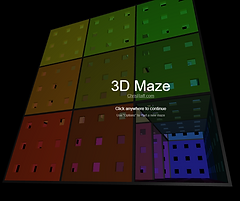
Colourful Aesthetic & Grid Design

Replayability & Difficulty Scaling

Breadcrumbing - The exit is always visible

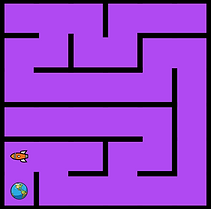
Difficulty Scaling - Level Progression Increases Difficulty
Level 1 Level 5
Research Report
AI Random Roam
The first technique that I want to include in my maze game is randomly roaming enemy AI, the first source I looked at was a YouTube tutorial. This source explained the fundamentals of the AI system and how to apply that to create randomly moving AI NPC’s,the source states that we need to use an origin point of the AI actor itself in order for the movements to be random and allow the exploration of the specific area chosen, ‘If it's [origin point] the AI location then it will constantly be changing so they can explore the entire map in the area that we define’ (Matt Aspland, 2022). This is important for my game because I want random movement but also within a confined space of the maze map, the AI will not interact with the player, but stick to the shadows. A key area that was also said, ‘Delete components that I do not need for example the camera’ (Matt Aspland, 2022), I should remember to not include any components of this type in my AI characters code in order for it to work.
A second source that I found explained the mechanic again and to my surprise the source explained the method in the same way, I found a few key points from this source, ‘lets create a custom event and this can be called [...] roaming and we want to call this event from the event benign play’(Lisowi, 2023), this is extremely similar to the previous source where a custom event was also required. In addition, just like the previous source, this one highlighted that I need to set out an area that the AI can roam in, ‘Get a self reference [...] and the destination you want to be get random reachable point in radius.’(Lisowi,2023), this has shown me that this is a key area to include when implementing the AI because both sources have highlighted this.
Overall, I will be applying knowledge from both sources because they both back each other up and explain the same mechanic, so I will be applying this knowledge in my game to achieve a random roaming NPC because I really want to add the feeling that the player is being watched whilst exploring the maze. I feel I will be successful at implementing this because I have two video sources to fall back on if my code was to fail.
Particles - Niagara System
The second technique that I want to include in my maze game is particles and particle emitters. I want to add these to add to the atmosphere and to also allow me to use a unique and creative breadcrumbing experience. The first source I looked at was a forum post, this source gives a brief overview of how to add a Niagara system to Unreal, ‘To create a new Niagara system, right-click in the Content Browser and click FX > Niagara System.’(Epic Games, Inc., 2024), this is helpful as I now know where to find the system's location. From here the forum page explains every feature within the system, here are a few key points, ‘Emitters are where particles are generated [...] controls how particles are born [...] and how the particles look and behave’(Epic Games, Inc., 2024), from past knowledge of particles and emitters from Minecraft I have an idea of this feature and know that this is where particles are spawned from, this is what I will need to use in my game in order to achieve the particles, so the rest of the forum doesn’t apply at this time.
A second source I found also explained the system in a very similar way except more to the point, ‘Search for Niagara [...] and just activate the Niagara’(Unreal Matter, 2023). This is exactly the same as the previous so I will be following the same steps. They then explained emitters, these worked in the exact same way as the forum explained, ‘Click go to Niagara system and we want a new system from selected emitters’(Unreal Matter, 2023).
From both the sources I can tell that this is the standard way of adding particles and because of this I will be following both sources to add particles for atmosphere and also breadcrumbing. I believe that I will be successful at adding this because I will carry out experimentation to iron out any problems.
Bibliography
Epic Games, Inc. (2024) Niagara Overview [Online] Available at: https://dev.epicgames.com/documentation/en-us/unreal-engine/overview-of-niagara-effects-for-unreal-engine [Accessed 10th October 2024]
Lisowi. (2023). Easy AI Roam Tutorial - Unreal Engine 5.2. [online] Available at: https://www.youtube.com/watch?v=TGKXzmGnfss. [Accessed 7th October 2024]
Matt Aspland. (2022). AI Random Roam | Basic Roaming - Unreal Engine 5 Tutorial. [online] Available at: https://www.youtube.com/watch?v=Mi7r0LqUmOE. [Accessed 7th October 2024]
Unreal Matter. (2023). How to create a Niagara Dust System in Unreal Engine 5 [online] Available at: https://www.youtube.com/watch?v=Tv56707I8So. [Accessed 7th October 2024]


